Amytis connects supply records through a project-scoped Laboratory Information Management System (LIMS), bringing lab inventory management into the same working environment as experimental protocols and samples.

Freddie Starkey
Co-founder & CTO

A bottle of ethanol in a laboratory has a quantity, batch, supplier, storage location and expiry date, but managing it within an active research project also means knowing which protocols use it, how much remains after each experiment and whether the available stock is still usable.
Amytis connects these records through a project-scoped Laboratory Information Management System (LIMS), bringing lab inventory management into the same working environment as experimental protocols and samples.
Lab inventory management for reagents and equipment
The Amytis LIMS sits alongside the project canvas and provides a structured record of reagents, equipment, samples, laboratory documents and protocol runs. Its Overview brings inventory levels, stock alerts and recent experimental activity together, giving researchers a current view of the physical resources associated with a project without separating inventory management from the experiments that change it.
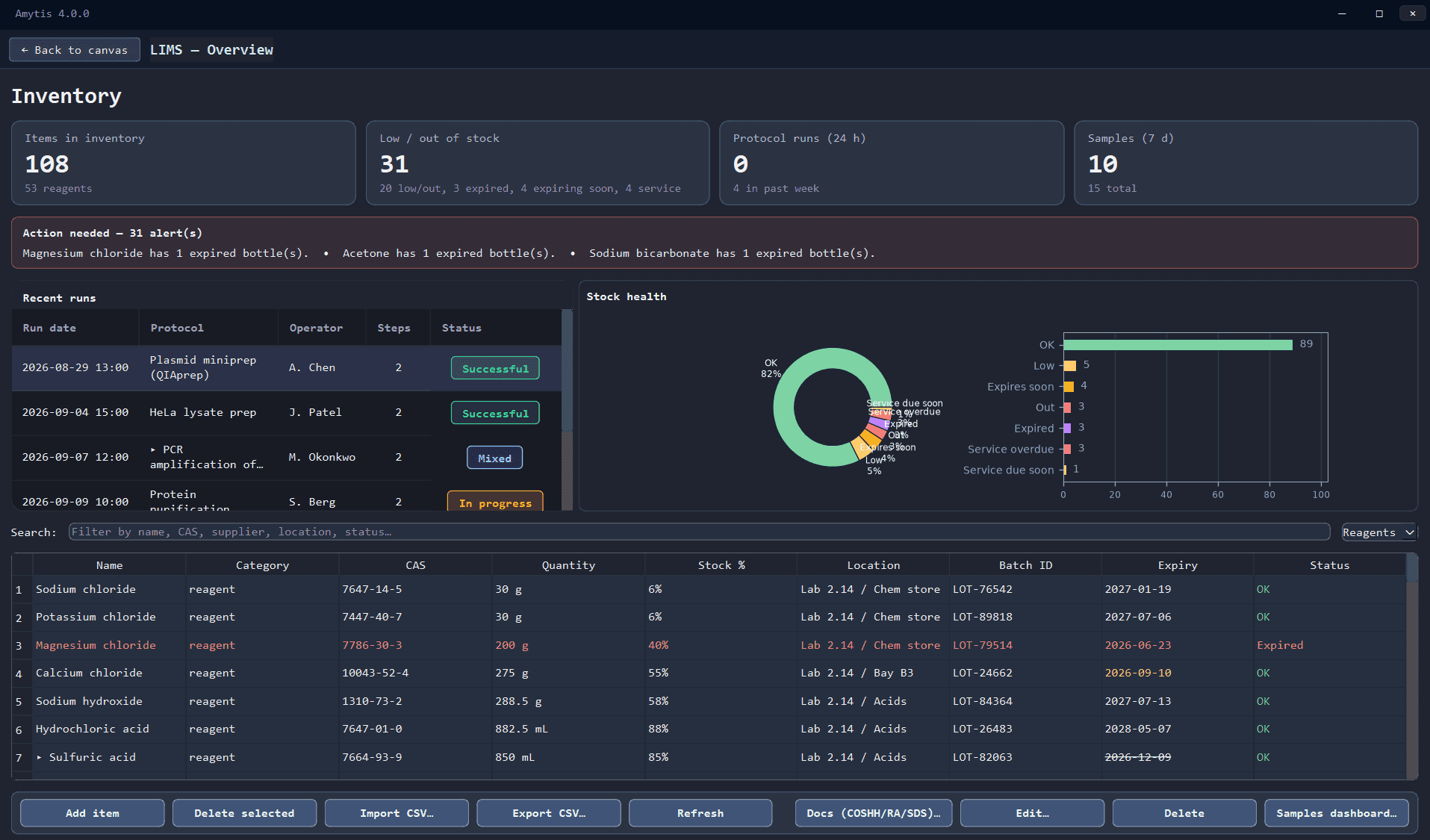
Reagent inventory records contain the information needed to identify, locate and manage laboratory supplies, including chemical name, CAS number, supplier, lot or batch, quantity, unit, storage location and expiry date. Researchers can set low-stock and expiry thresholds while keeping COSHH assessments, risk assessments and safety data sheets attached to the relevant material.
Storage locations can be recorded directly or linked to equipment already registered in LIMS, allowing reagents to be assigned to a particular fridge or freezer. Equipment records can include model, equipment type and service information, so upcoming or overdue maintenance can be monitored alongside reagent inventory.
Laboratory stock rarely maps neatly to one row per substance, particularly when the same reagent is held across several bottles, batches or expiry dates. Amytis groups matching reagents in the inventory while preserving individual batches underneath, and expired batches are excluded from available stock calculations. You can therefore see the total usable quantity of a reagent while retaining the batch-level information needed at the bench.
Adding, importing and filtering laboratory inventory
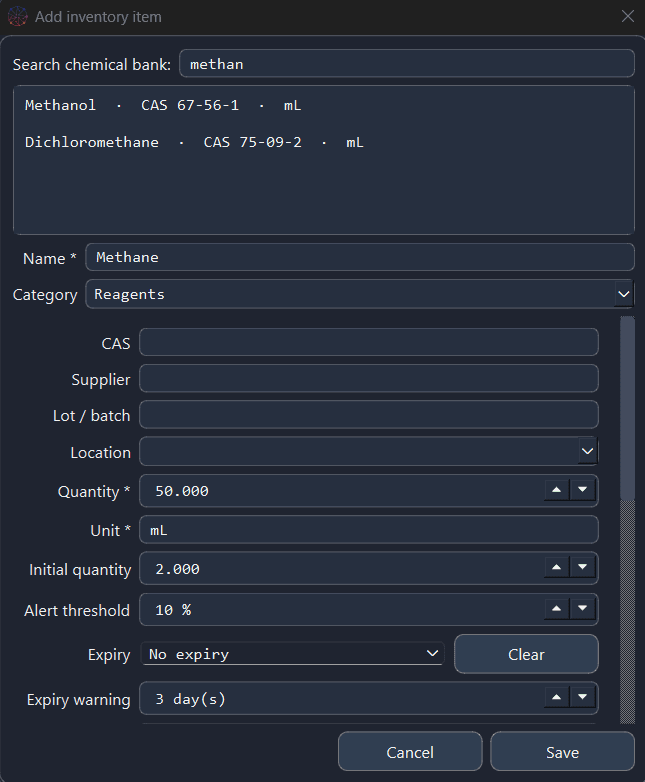
New reagents can be added from the LIMS Overview, where a built-in chemical search can identify common substances by chemical name or CAS number and fill basic chemical information automatically. Quantity, location, supplier, lot and expiry can then be recorded for the material actually held in the laboratory.
Existing inventories can be brought into Amytis through CSV import, reducing the work required to move an established reagent inventory into a project, while CSV export allows the current inventory to remain usable in external workflows.

As the inventory grows, the Inventory Dashboard provides search and filtering across fields such as category, location, supplier, stock status and date, with saved filters supporting recurring tasks such as reviewing low-stock reagents or upcoming expiries. The resulting inventory remains grounded in individual materials and batches while providing a broader view of stock across the project.
Using AI to query laboratory inventory and LIMS data
Structured dashboards remain useful for browsing and managing laboratory records, while some tasks begin with a narrower information need, such as finding reagents that are running low, checking upcoming expiries or tracing samples back to previous experiments.
LIMS Query provides a read-only AI interface to the project’s laboratory data from the Amytis canvas. Researchers can ask questions across reagents, equipment, samples, documents, protocol runs and alerts using ordinary language, with queries such as Which reagents are low or out of stock?, What expires this week?, Which instruments have overdue servicing? or Which samples came from failed runs?
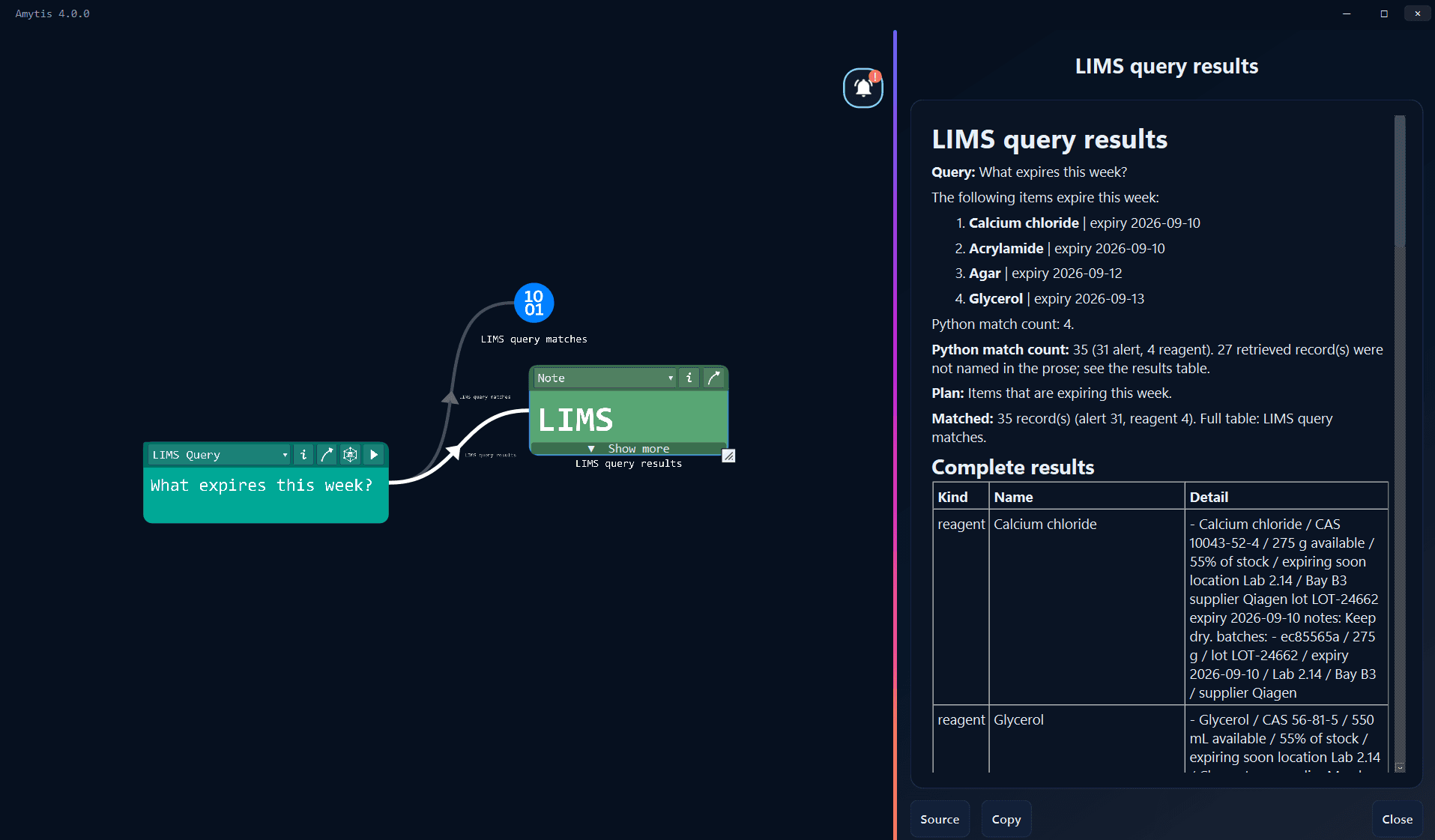
Questions can also reach experimental history. A researcher could ask what a Western blot protocol consumed during a particular period, search for a reagent by CAS number, or retrieve information from a laboratory SOP. The response is grounded in the matching LIMS records, with the underlying results retained alongside the written answer so that the source data remains available for inspection.
For larger requests, such as listing the project’s complete reagent inventory, results can remain in structured form rather than being compressed into a long AI-generated response. Relevant protocol results can also lead back to their cards on the canvas, keeping queries connected to the experimental context behind the data.
LIMS Query is read-only, so queries do not alter quantities, create samples or edit laboratory records. It provides a faster route through the same project data used by the inventory dashboards.
Connecting LIMS inventory with experimental protocols
Inventory becomes more useful when stock movements reflect laboratory activity rather than relying entirely on manual updates. Protocol cards on the Amytis canvas can reference reagents and samples held in LIMS, including the quantities required for each experimental run.
When a protocol run is recorded, consumed reagents can be deducted from available, non-expired inventory, with compatible units handled when the protocol and inventory use different measurements. Researchers retain control over whether stock changes for a particular run, which matters when an experiment fails before a reagent is consumed or when only part of the planned material was used.

Protocol outputs can also become sample records, allowing sample tracking to begin from the experiment that created them. Each recorded run preserves its outcome together with the materials consumed and samples produced, creating a traceable relationship between the protocol on the canvas and the inventory records affected by it.
Stock and equipment alerts follow the same underlying records. Reagents can be flagged as low, out of stock, expired or approaching expiry, while equipment can be highlighted when servicing is due or overdue. Selecting an alert filters the relevant inventory, turning routine stock monitoring into a view of the materials that need attention.
Get started