Socrates is Amytis’ Socratic reasoning and AI critique agent. It’s designed to expand a workflow graph rather than provide a conventional review returned as a block of text.

Freddie Starkey
Co-founder & CTO

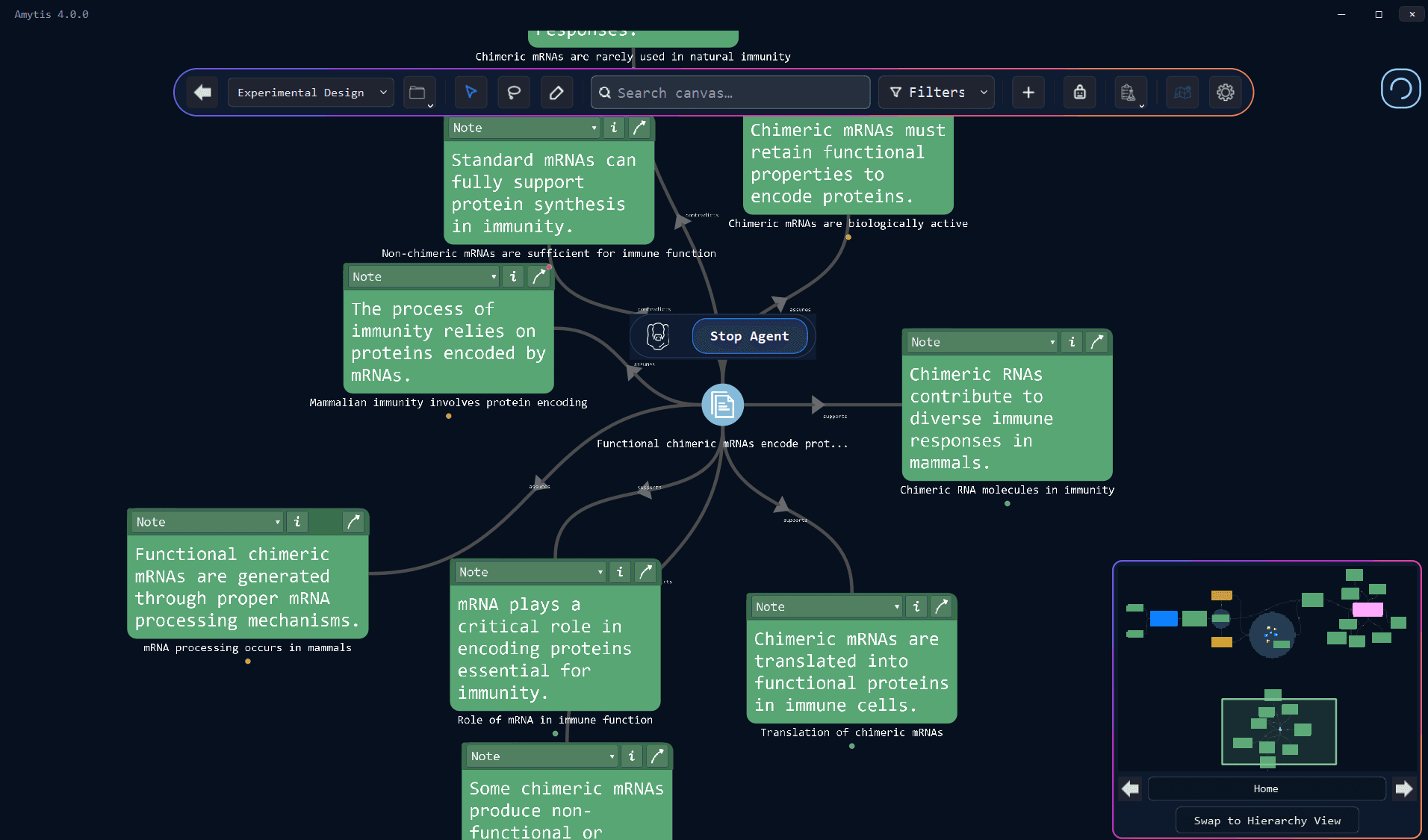
Socrates is Amytis’ Socratic reasoning and AI critique agent. It’s designed to expand a workflow graph rather than provide a conventional review returned as a block of text. Each observation generated by Socrates becomes a card on the canvas, connected to the material that produced it, so criticism remains alongside the work and can become the starting point for further analysis.
Prompt the Socrates agent to critique your work
Once Socrates is attached to a compatible Amytis card, a portrait bar appears on the node and the agent begins running in the background.
Every few seconds, Socrates reads a short snapshot of the focus card and applies one of six reasoning operators:
Evidence looks for concrete support behind a claim
Assumption identifies premises on which the argument depends
Counter-evidence considers information that could weaken the claim
Perspective develops another framing
Implication follows the consequences of the idea
Clarifying question identifies points that require greater precision.
The resulting observations are deliberately small, usually consisting of a short label and a sentence of detail, and one to three of these notes are placed around the source card during each expansion. Colour tags distinguish the reasoning operators, while relationships such as supports, assumes, contradicts, relates_to, and implies preserve how each new card relates to the original material.
Socrates will continue to run until you tell it to stop.
The Socrates agent creates a visible argument or AI critique map, with supporting evidence and objections occupying separate nodes rather than disappearing inside a long AI-generated response. These cards can be edited, rearranged, connected to other material, or selected for another round of Socratic graph expansion. The critique therefore stays close to the work that generated it, with the canvas recording both the original idea and the paths opened by examining it.
2. Use Socrates to evaluate Data and Files
Socrates can also be attached to Data, File, Media, and JSON cards. It works from a snapshot of the focus card.
For a spreadsheet or dataset, Socrates can therefore critique the assumptions or questions surrounding the material without automatically performing a detailed analysis of every value in the underlying file.
When computation would materially advance the investigation and Python is available, Socrates can propose a Python Factory, connect nearby data-related cards as inputs, and use computation for tasks such as checks, transformations, or plots. A conceptual question raised during graph expansion can consequently lead into a concrete analysis while remaining connected to the reasoning that prompted it.
3. Adjust the Socrates agent to generate deeper critique
Dropping Socrates directly onto a card starts the agent in Manual mode, where it continues examining the selected node and rotates through its six reasoning operators until the user stops it.
Amytis also supports Depth-First, Breadth-First, and Random node selection. You can adjust these mode settings by going to Settings and searching for ‘Agent’. These modes allow Socrates to move from the original material onto the questions and observations it has generated, turning a local critique into a larger reasoning graph.
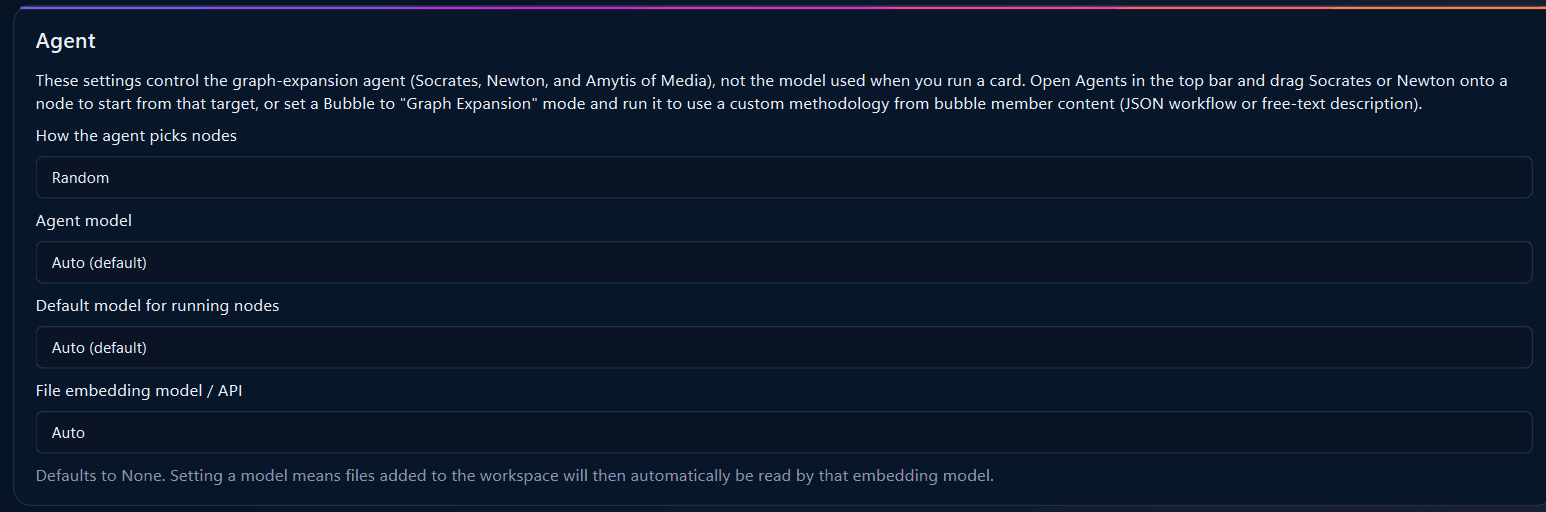
The choice of mode determines whether Socrates remains concentrated around the source material or begins exploring the consequences of its own critique:
Depth-First expansion can follow a particular assumption or question through successive layers
Breadth-First expansion distributes attention across nearby nodes.
Random selection provides a less predictable route through the developing graph.
As the canvas expands, Socrates checks for similar existing ideas and can link to an earlier card instead of creating a duplicate. New nodes also retain provenance information, including their source and the graph-expansion operator that generated them, which helps preserve the structure of the analysis as the number of cards increases.
4. Selecting the right tool to evaluate your work
Socrates is suited to material whose weaknesses or possible directions have not yet been mapped. A research claim may attract evidence and counter-evidence, while an early proposal may generate assumptions and clarifying questions that can themselves become new targets for expansion.
If you don’t need this level of critique, the Amytis platform provides several other approaches to AI-assisted review:
Prompt nodes support direct requests for a review, gap analysis, or reviewer-style assessment.
Bubble → Graph Expansion allows a user to supply a custom methodology or JSON workflow.
Custom nodes provide another option when you are likely to need a repeatable, specialist role. You can set up a custom node by navigating to Settings and searching for ‘Custom Node’. These nodes can then be added onto any workflow to complete the custom instruction.
The Newton agent follows a scientific reasoning sequence involving stages such as observation, question, hypothesis, prediction, experiment, result, and interpretation, while also considering alternatives, confounders, and limitations.
Get started